When using gitlab ci, it always take a long time to build docker image because cache is not used.
Here is how to setup executer using local cache to speedup build time.
When do you need this?#
If you have a standalone server that only used for gitlab runner, Shell Executor orUse Docker socket binding should be enough for you. You can skip this article.
If you can bear few minutes build time, just use kaniko or Use Docker-in-Docker.
Keep watching if you don’t want to use socket binding or shell executor and want to reduce docker build time from few minutes to few seconds.
Setup GitLag Runner#
get registation token from gitlab admin panel,
/admin/runnersset var
GITLAB_HOST=192.168.0.11
GITLAB_PORT=443
GITLAB_URL="https://${GITLAB_HOST}:${GITLAB_PORT}/"
REGISTRATION_TOKEN="xxxxxxxxxxxxx"

HARBOR_HOST=192.168.0.12
HARBOR_PORT=443

DEPLOY_FOLDER=/srv/gitlab-runner
perpare file ane folder
mkdir -p ${DEPLOY_FOLDER}
mkdir -p ${DEPLOY_FOLDER}/config
mkdir -p ${DEPLOY_FOLDER}/config/certs
cd ${DEPLOY_FOLDER}

# download gitlab server certificate
openssl s_client -showcerts -connect ${GITLAB_HOST}:${GITLAB_PORT} < /dev/null 2>/dev/null | sudo openssl x509 -outform PEM > ${DEPLOY_FOLDER}/config/certs/${GITLAB_HOST}.crt

# download harbor server certificate
openssl s_client -showcerts -connect ${HARBOR_HOST}:${HARBOR_PORT} < /dev/null 2>/dev/null | sudo openssl x509 -outform PEM > ${DEPLOY_FOLDER}/${HARBOR_HOST}.crt
register gitlab runner and generate config file
sudo docker run --rm -v ${DEPLOY_FOLDER}/config:/etc/gitlab-runner/ docker.io/gitlab/gitlab-runner:v15.8.2 register \
 --non-interactive \
 --tag-list="dind-runner" \
 --name="dind-runner" \
 --executor "docker" \
 --docker-image "docker:23" \
 --docker-tlsverify="false" \
 --run-untagged="true" \
 --custom_build_dir-enabled \
 --builds-dir="/builds" \
 --docker-volumes="/builds:/builds" \
 --env='GIT_CLONE_PATH=$CI_BUILDS_DIR/$CI_CONCURRENT_ID/$CI_PROJECT_NAME' \
 --cache-dir="/cache" \
 --docker-volumes="/cache:/cache" \
 --docker-volumes="/var/run/docker.sock:/var/run/docker.sock" \
 --docker-volumes="/etc/docker/certs.d:/etc/docker/certs.d" \
 --url="${GITLAB_URL}" \
 --registration-token="${REGISTRATION_TOKEN}"
update concurrent to 10
sudo sed -i 's/concurrent.*/concurrent = 10/' ${DEPLOY_FOLDER}/config/config.tomlcreate docker-compose file
echo "
services:
  dind:
    container_name: dind
    image: docker:23-dind
    restart: always
    privileged: true
    environment:
      # force docker deamon to disable TLS
      DOCKER_TLS_CERTDIR: ''
    command:
      - --storage-driver=overlay2
    networks:
      - gitlab-runner
    volumes:
      - ${DEPLOY_FOLDER}/${HARBOR_HOST}.crt:/etc/docker/certs.d/${HARBOR_HOST}/ca.crt

  runner:
    container_name: runner
    restart: always
    image: docker.io/gitlab/gitlab-runner:v15.8.2
    depends_on:
      - dind
    environment:
      - DOCKER_HOST=tcp://dind:2375
    volumes:
      - ${DEPLOY_FOLDER}/config:/etc/gitlab-runner
    networks:
      - gitlab-runner

networks:
  gitlab-runner: {}
" > ${DEPLOY_FOLDER}/docker-compose.yml
start container
cd ${DEPLOY_FOLDER} && docker compose up -d --waitview logs
docker compose logs -n 100 -f
you can download single script file here
create gitlab-ci file#
create .gitlab-ci.yml file in your git project and commit, it will trigger pipline
build-docker-image:
  stage: deploy
  tags:
    - docker-dind-runner
  variables:
    CI_REGISTRY: 192.168.0.12:443
    CI_REGISTRY_USER: admin
    CI_REGISTRY_PASSWORD: xxxxxxxx
  script:
    - docker login -u "$CI_REGISTRY_USER" -p "$CI_REGISTRY_PASSWORD" $CI_REGISTRY
    - docker build . -t "${CI_REGISTRY}/apps/${CI_PROJECT_PATH_SLUG}:latest" --build-arg BUILDKIT_INLINE_CACHE=1
    - docker push "${CI_REGISTRY}/apps/${CI_PROJECT_PATH_SLUG}:latest"
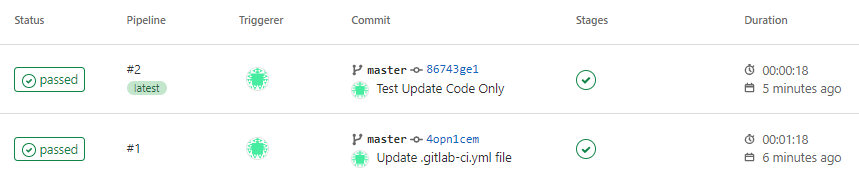
.csproj file, you can use docker build layer local cache.
you can watch job container created inside dind container when trigger job
docker exec -t dind watch -n 1 docker ps

also setup crontab to clearup every month prevent disk full
(crontab -l && echo "0 0 1 * *  docker exec dind docker system prune --all --force --filter 'until=168h'") | crontab -
(crontab -l && echo "0 0 1 * *  docker exec dind docker system prune --all --force --volumes") | crontab -
crontab -l
評論